

Prerequisites for Spring Boot Development
A step-by-step guide that explains prerequisites for Spring Boot Development.
October 19, 2024 · 11 min read · Updated Sep 2025
Before we dive into developing Spring Boot applications, please ensure you have the following prerequisites in place:
- Java: Version 17 or above
- IDE (Integrated Development Environment)
- Build Tool: Maven or Gradle
Spring Boot 3.x requires Java 17 as a minimum baseline and supports newer LTS releases as they're published. Always check the Spring Boot releases page or start.spring.io for what's current when you start a new project.
Check if you have Java installed using the following command.
java --versionIf Java is not installed, you can follow the installation process from my blog post: How to Install Java for MacOS and Windows?
If you're installing Java for the first time, pick a free OpenJDK distribution such as Eclipse Temurin or Amazon Corretto — either works fine for Spring Boot development. Make sure you install the JDK (Java Development Kit), not just the JRE, since the JDK includes the compiler and tools needed to build applications.
IDE (Integrated Development Environment)
An Integrated Development Environment (IDE) is an all-in-one software tool for writing code. Think of it as a supercharged text editor built for developers. It helps you to write code faster, debug and fix bugs easily, keep files organized and keep all your commands in one place.
For Spring Boot application development, we have several IDE options available:
- VSCode - Free but requires Extension Pack for Java and the Spring Boot Extension Pack
- Eclipse - Free but requires Spring Tools plugin
- IntelliJ IDEA - Support both Free Community Edition and Licensed Ultimate Edition. It includes built-in Spring Boot support so no additional plugin installation required.
I prefer IntelliJ IDEA, as it stands out as one of the most advanced and widely used IDEs for Java developers. If you haven't installed it yet, you can download the Community Edition of IntelliJ here. Throughout this course, screenshots and instructions will reference IntelliJ IDEA, but everything shown works the same way in VSCode or Eclipse.
Choosing the Right Build Tools: Maven vs. Gradle
Build tools play a crucial role in software development. Build tools are used to automate the process of compiling, testing, packaging, and deploying your application. It can save a lot of time, especially when working with a large, distributed team.
Using build tools we can simplify the process of managing project dependencies. It helps to automate the process of including external libraries in your project and resolving the dependencies automatically.
Primarily there are two popular build tool choices for writing Java applications; Maven and Gradle.
Maven
Maven is a popular build automation tool used primarily for Java projects. Maven is almost 20 years old and was first introduced in 2004.
It uses an XML file called a pom.xml (Project Object Model) to define the project's configuration. The pom.xml file serves as the central configuration file for managing dependencies, plugins and build configurations for the Java project. It contains details about the project, including its dependencies, plugins, build lifecycle, and other relevant project metadata.
pom.xml
<?xml version="1.0" encoding="UTF-8"?>
<project xmlns="http://maven.apache.org/POM/4.0.0" xmlns:xsi="http://www.w3.org/2001/XMLSchema-instance"
  xsi:schemaLocation="http://maven.apache.org/POM/4.0.0 https://maven.apache.org/xsd/maven-4.0.0.xsd">
  <modelVersion>4.0.0</modelVersion>
  <parent>
    <groupId>org.springframework.boot</groupId>
    <artifactId>spring-boot-starter-parent</artifactId>
    <version>3.3.4</version>
    <relativePath/> <!-- lookup parent from repository -->
  </parent>
  <groupId>com.stacktips</groupId>
  <artifactId>hello-spring</artifactId>
  <version>0.0.1-SNAPSHOT</version>
  <name>hello-spring</name>
  <description>Demo project for Spring Boot</description>
  <properties>
    <java.version>17</java.version>
  </properties>
  <dependencies>
    <dependency>
      <groupId>org.springframework.boot</groupId>
      <artifactId>spring-boot-starter-web</artifactId>
    </dependency>

    <dependency>
      <groupId>org.springframework.boot</groupId>
      <artifactId>spring-boot-starter-test</artifactId>
      <scope>test</scope>
    </dependency>
  </dependencies>

  <build>
    <plugins>
      <plugin>
        <groupId>org.springframework.boot</groupId>
        <artifactId>spring-boot-maven-plugin</artifactId>
      </plugin>
    </plugins>
  </build>

</project>Gradle
Gradle is yet another build automation tool, it was first introduced in 2007. Gradle uses either Groovy or Kotlin DSL (Domain-Specific Language) for defining build scripts. Gradle maintains the dependency configurations in build.gradle file.
The build.gradle file is typically stored in the project's root directory. An example of a Gradle build file for a Spring Boot application follows.
build.gradle
plugins {
  id 'java'
  id 'org.springframework.boot' version '3.3.4'
  id 'io.spring.dependency-management' version '1.1.6'
}

group = 'com.stacktips'
version = '0.0.1-SNAPSHOT'

java {
  toolchain {
    languageVersion = JavaLanguageVersion.of(17)
  }
}

repositories {
  mavenCentral()
}

dependencies {
  implementation 'org.springframework.boot:spring-boot-starter-web'
  testImplementation 'org.springframework.boot:spring-boot-starter-test'
  testRuntimeOnly 'org.junit.platform:junit-platform-launcher'
}

tasks.named('test') {
  useJUnitPlatform()
}Though Gradle is relatively new, it has gained popularity due to its ability to handle complex build automation and dependency management capability.
Choosing Between Maven and Gradle
While Maven is a well-established standard in the Java community, Gradle has emerged as a modern build system that has gained significant popularity in recent years. Both Gradle and Maven are powerful tools, making them suitable for larger and more complex projects.
The choice between Maven and Gradle for Spring Boot development depends on your personal preferences and the specific needs of your project.
- Maven uses an XML file (pom.xml) for configuration, which can become verbose and complex for larger projects.
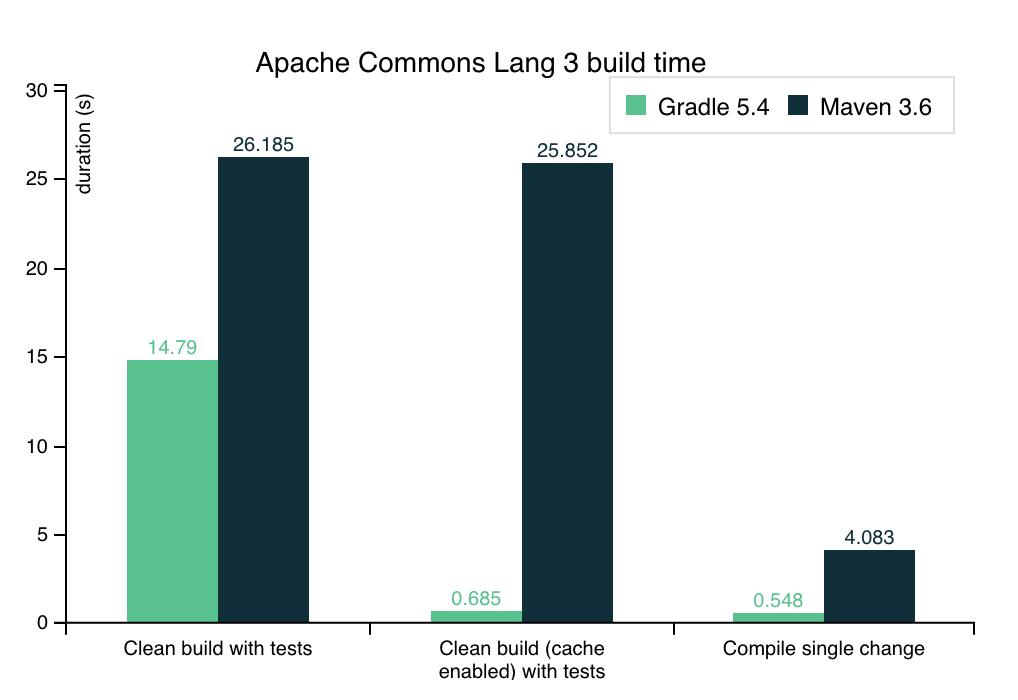
- Maven tends to have slower build times due to its less efficient handling of incremental builds and parallel execution. Read more here
- Choose Gradle if you prefer modern, expressive DSL for configuration (Groovy or Kotlin).
Which one should you use in this course?
Either works, but this course uses Gradle for its project examples — you'll see a build.gradle file in the project structure walkthrough in the next couple of chapters. If you'd rather follow along with Maven, that's fine too: every concept we cover works identically regardless of build tool, and Spring Initializr lets you generate the same project with either one.
Now that your Java version, IDE, and build tool are sorted, you're ready to create your first Spring Boot project. In the next lesson, we'll use Spring Initializr to generate a project and open it in your IDE.